


Have a question about this product? Ask below and we’ll get back to you shortly. write a review.

- Shop by eCommerce Platforms Connect with Experts
Hire an Agile Team for
your businessCreate your own agile squad with experienced
members for your business. - Services YOUR
Numinix Journey
CHOOSEYour Service
Connect with ExpertsHire an Agile Team for your business
Create your own agile squad with experienced members for your business.
1 of 3- Web Development
- Design
- Installs & Upgrades
- Security & Support
- Digital Marketing Services
- API Development
- Speed Optimization
- Plugins
- Web Template-Themes
Connect with ExpertsHire an Agile Team for
your businessCreate your own agile squad with experienced
members for your business. - Plugins Connect with Experts
Hire an Agile Team for your business
Create your own agile squad with experienced members for your business.
- Plans
- Portfolio
- About Connect with Experts
Hire an Agile Team for your business
Create your own agile squad with experienced members for your business.
Product Comparison for Zen Cart
- Description
- Ask & Answer
- Features
- Requirements
- Version History
Description
Help Shoppers Choose Faster with Side-by-Side Comparison
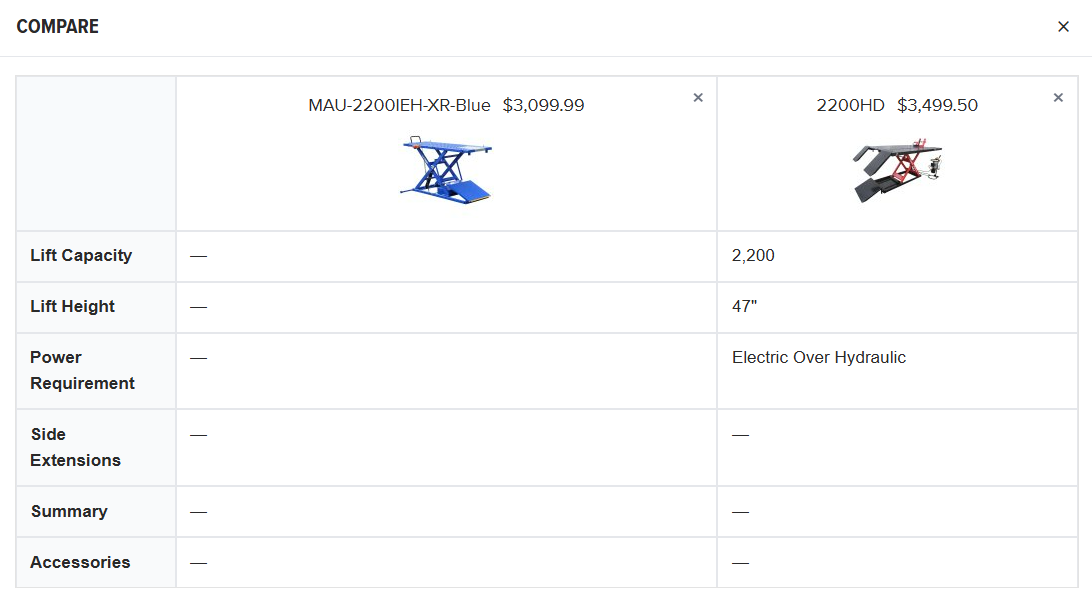
Product Comparison for Zen Cart adds polished compare checkboxes to your product listings and opens a clean modal that puts the specs that matter side by side. Merchants control exactly which comparison rows appear per category, so customers see a focused decision table instead of a wall of product description text.
Built for Real Catalogs
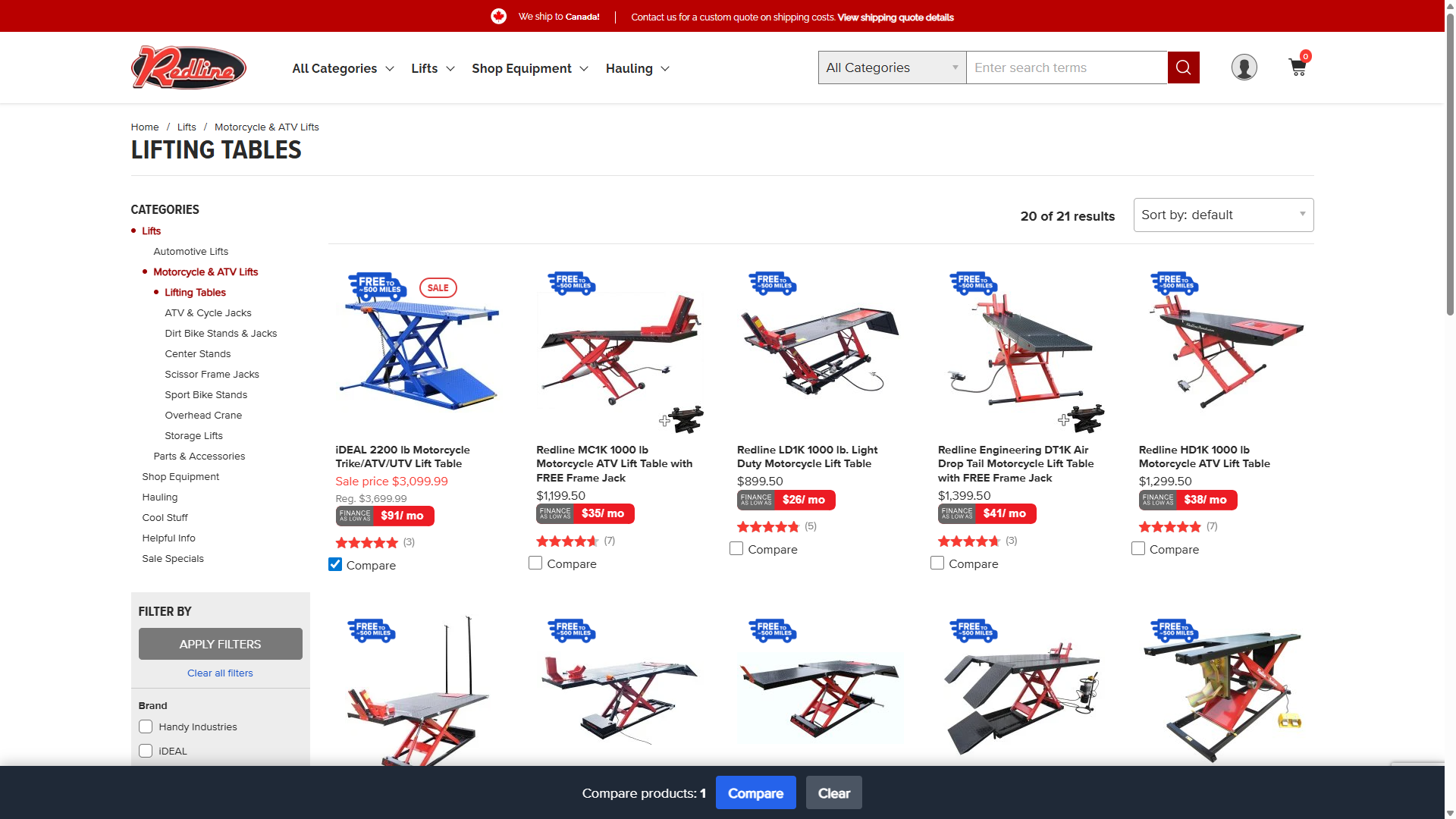
- Listing-page Compare — checkboxes on category and search results, with an optional control on the product information page.
- Sticky compare bar — selection count, Compare, and Clear stay visible while shoppers browse.
- Category templates — Tools → Product Comparison Templates assign ordered comparison fields to one or more categories (and their subcategories).
- Fill values — spreadsheet-style bulk editor for every product in a template’s categories, with search, active-only filtering, empty-only, and category filters.
- Create & add field — add a comparison row by name; with Numinix Product Fields installed, the product column and product-edit box are created automatically.
- Focused storefront table — show only the specs you choose (for example capacity, height, power, and key selling points) alongside model and price.
- Settings that fit your store — enable/disable the tool, set max selections, limit to template categories, and control which global fields appear.
- Encapsulated Zen Cart 2.x plugin — installs under
zc_plugins/ProductComparison/through Plugin Manager with no core file edits and a domain-bound Numinix license gate.
Pricing
$10/month · $100/year · $300 lifetime (per licensed domain).
Compatibility & Requirements
- Zen Cart: 2.0.0 and newer (encapsulated plugin format).
- PHP: 7.4+ with OpenSSL, cURL, and JSON.
- Recommended: Numinix Product Fields for merchant-managed comparison specs.
- License: active domain-bound license required for live storefronts.
Screenshots
License & Support
The plugin checks its license against numinix.com for the installed domain. Without an active license on a live host, comparison features stay disabled. Documentation ships with the plugin package; support is available through Numinix Support.
Ask & Answer
Have a question about this product? Ask below and we’ll get back to you shortly.
Features
- Compare checkboxes on product listings and product info pages.
- Sticky compare bar with selection count, Compare, and Clear.
- Category Comparison Templates with ordered merchant-defined fields.
- Fill values bulk editor for products in assigned categories and subcategories.
- Create & add field auto-provisions Numinix Product Fields and product-edit UI.
- Dedicated Settings page for enablement, limits, and field/attribute includes.
- Encapsulated Zen Cart 2.x plugin with domain-bound Numinix licensing.
- $10/month, $100/year, or $300 lifetime license.
- Compatible with Zen Cart 2.0.0+ and PHP 7.4+.
Requirements
Platform
- Zen Cart
Version
- 2.0.1
- 2.1.0
- 2.0.0
Version History
| 1.0.24 | Nov 2, 2026 | View change log 1.0.24 Change logVersion notes
Added
Modified
|
| 1.0.18 | Sep 10, 2026 | View change log 1.0.18 Change logVersion notes
Added
Modified
|
| 1.0.8 | Aug 21, 2026 | View change log 1.0.8 Change logVersion notes
Added
Modified
|
| 1.0.7 | Aug 21, 2026 | View change log 1.0.7 Change logVersion notes
Added
Modified
|
No reviews yet. Be first to write a review.
Reviews
Recommended Products
Service Policy
Our stated prices for all modules we install are based on installation into the default platform configuration. We always ensure your logo and basic color palette are in place when we install a plugin. However, any additional "custom" styling, design work, or derivitive tasks generated due to a site's non-default configuration could require additional prepaid programming hours.
This plugin is open source and requires ionCube Loader v4.4 or later to be compiled with PHP in order to install and upgrade the plugin. All orders are automatically subscribed to the billing frequency selected at the time of purchase. Recurring billing can be cancelled at any time. Once your license has expired, a new license will be required in order to continue using the plugin.
