


Have a question about this product? Ask below and we’ll get back to you shortly. write a review.

- Shop by eCommerce Platforms Connect with Experts
Hire an Agile Team for
your businessCreate your own agile squad with experienced
members for your business. - Services YOUR
Numinix Journey
CHOOSEYour Service
Connect with ExpertsHire an Agile Team for your business
Create your own agile squad with experienced members for your business.
1 of 3- Web Development
- Design
- Installs & Upgrades
- Security & Support
- Digital Marketing Services
- API Development
- Speed Optimization
- Plugins
- Web Template-Themes
Connect with ExpertsHire an Agile Team for
your businessCreate your own agile squad with experienced
members for your business. - Plugins Connect with Experts
Hire an Agile Team for your business
Create your own agile squad with experienced members for your business.
- Plans
- Portfolio
- About Connect with Experts
Hire an Agile Team for your business
Create your own agile squad with experienced members for your business.
New in v1.2.0 Ecommerce Attribution Tracking
Transactional Marketing for zen cart
Cron-driven drag-and-drop email campaigns that recover abandoned carts, win back dormant customers, trigger review reminders, announce new products, and welcome new accounts — with per-email Orders and Revenue reporting baked in.


Transactional Marketing for Zen Cart
0 reviews
$50.00 USD$550.00 USD - Description
- Ask & Answer
- Features
- Requirements
- Version History
Description
Transactional Marketing for Zen Cart is a cron-driven, drag-and-drop email marketing platform that lives inside your store admin. Five ready-to-use campaign modules — Abandoned Cart, Dormant Customers, Review Reminders, New Product Notifications, and Welcome Email — run on a single 5-minute cron and now report results in dollars: every send is tagged with the Orders and Revenue it drove.
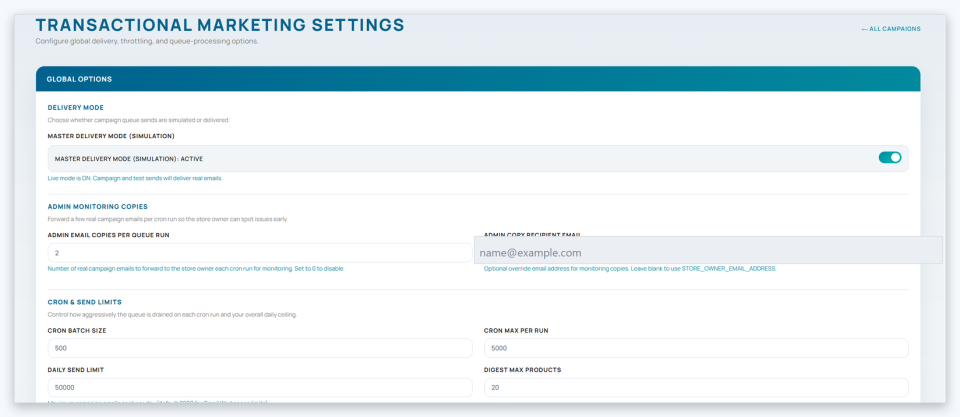
The walkthrough below covers what shows up in your admin once the plugin is installed: the campaign dashboard, the visual email builder, the new revenue-aware analytics, the global settings page, and the per-campaign configuration.
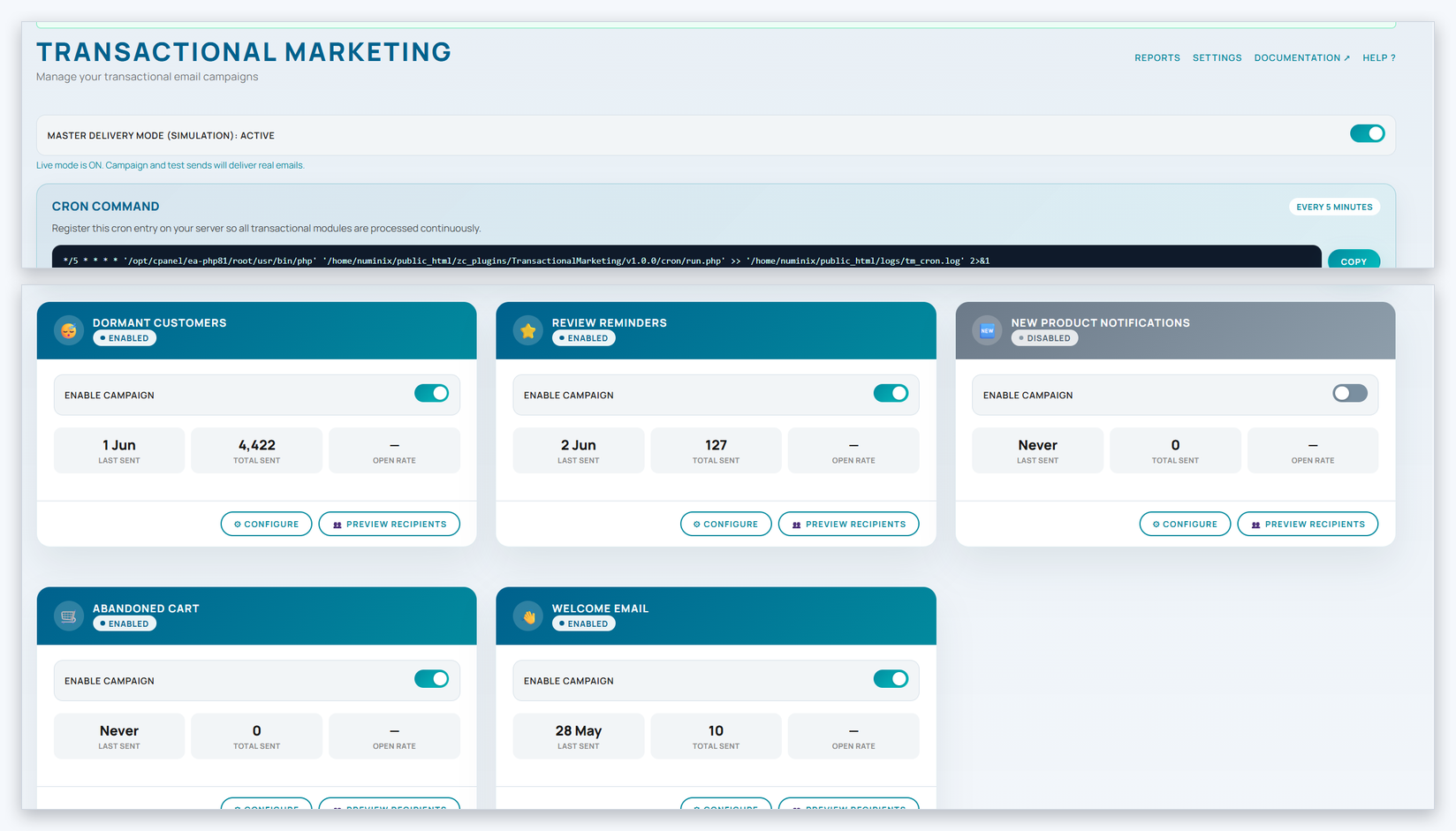
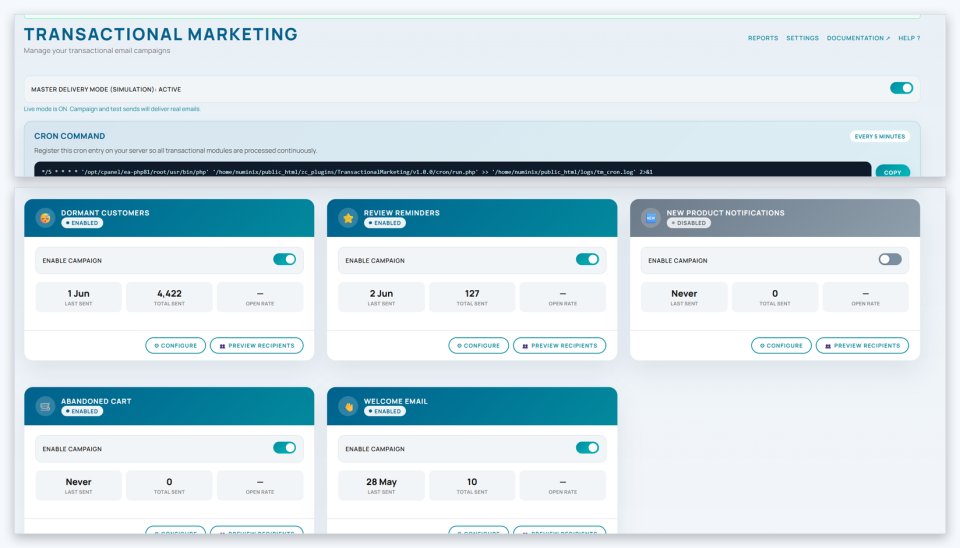
1. The campaign dashboard
One page, every campaign module. Each card shows the module's current status, recent send / open / click stats, and a master toggle. Click any card to open its full settings, template editor, and reports without ever leaving the dashboard.

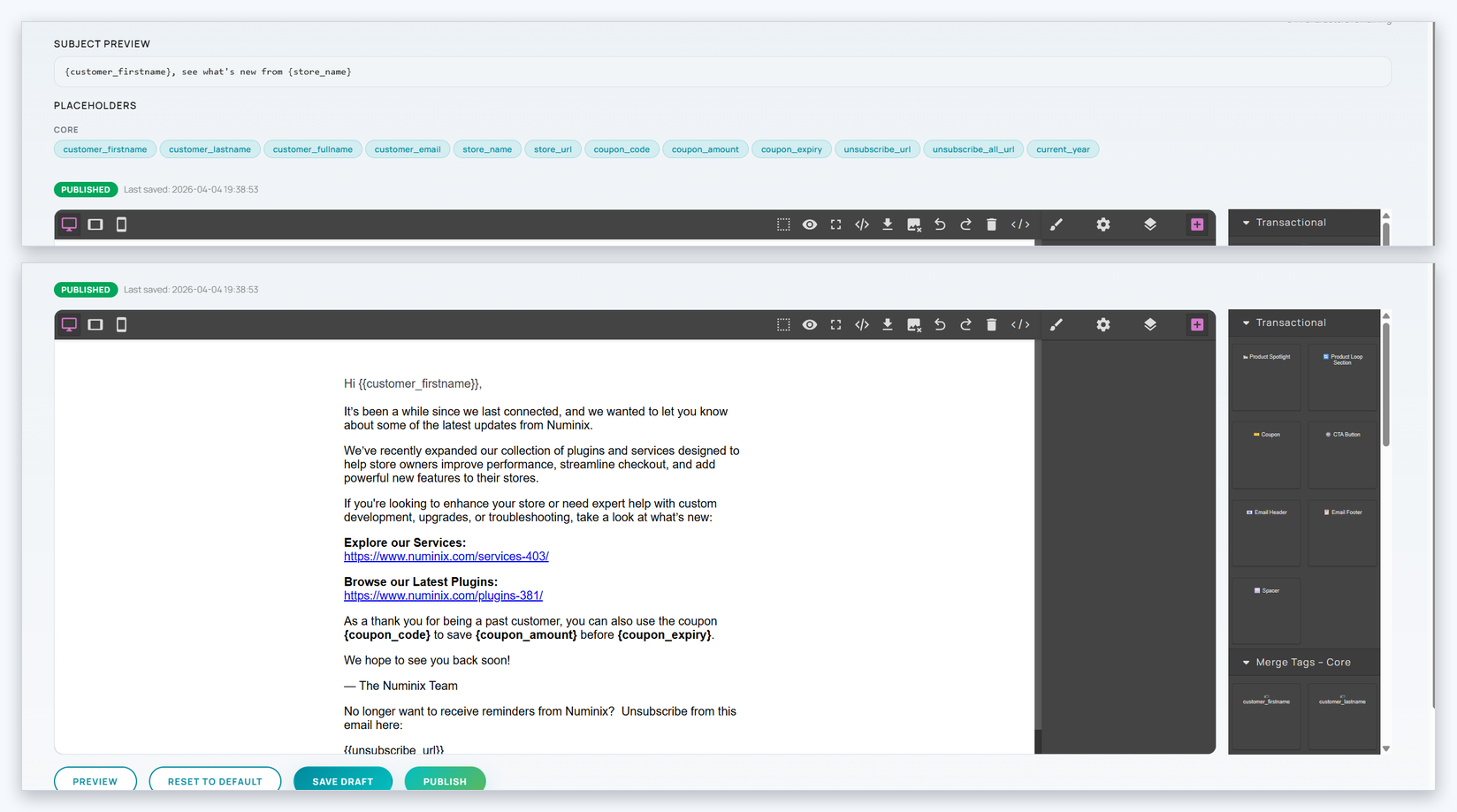
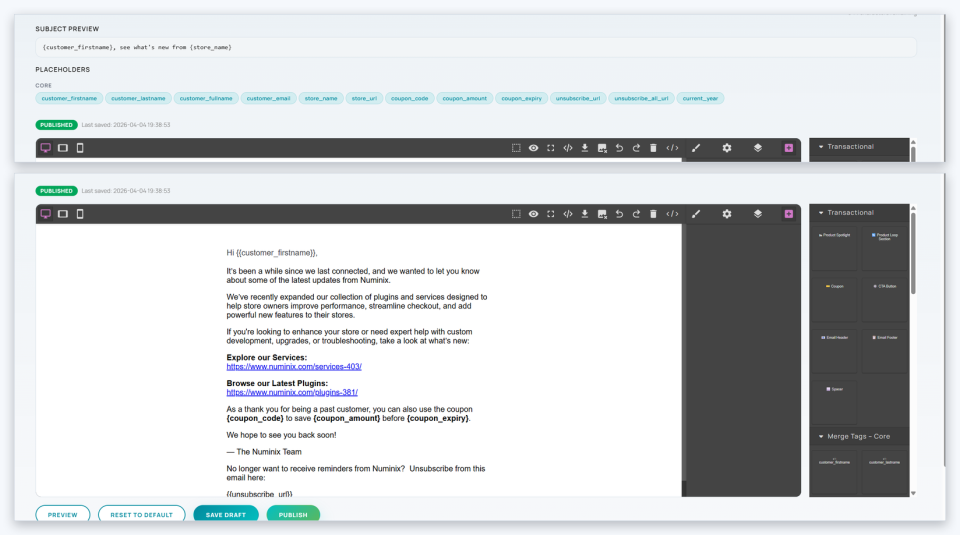
2. The drag-and-drop email builder
Powered by GrapesJS with email-specific blocks (Product Spotlight, Coupon, CTA Button, Email Header / Footer) and dynamic-token placeholders for customer, order, product, and coupon data. Templates have draft and published states with versioned history, so a work-in-progress edit never accidentally ships.

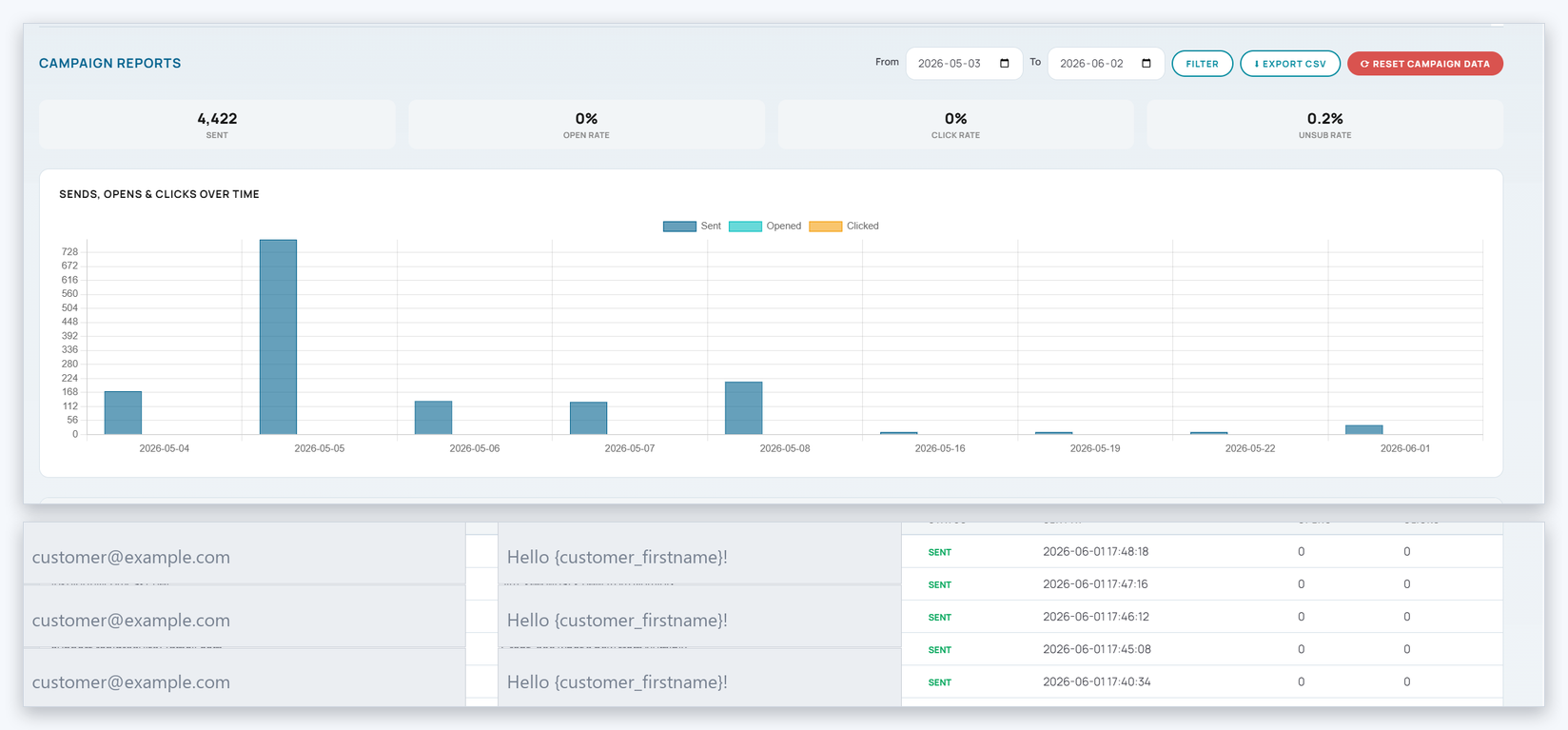
3. Revenue-aware analytics (new in v1.2.0)
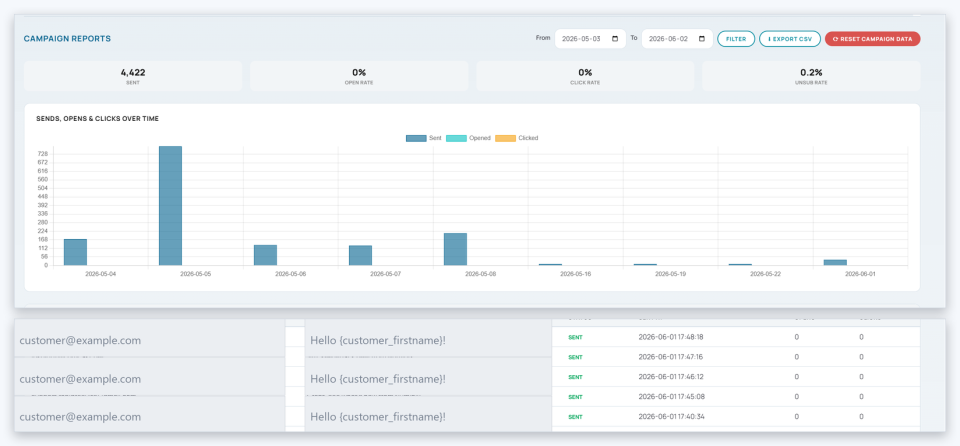
The Reports tab on every campaign now tracks Orders and Revenue alongside the existing Sends, Opens, Clicks, and Unsub rate — with the same data flowing into the per-recipient send log and CSV export. A first-party, HMAC-signed cookie does the attribution: no third-party scripts, no external analytics, everything stored in your own Zen Cart database with a configurable attribution window.

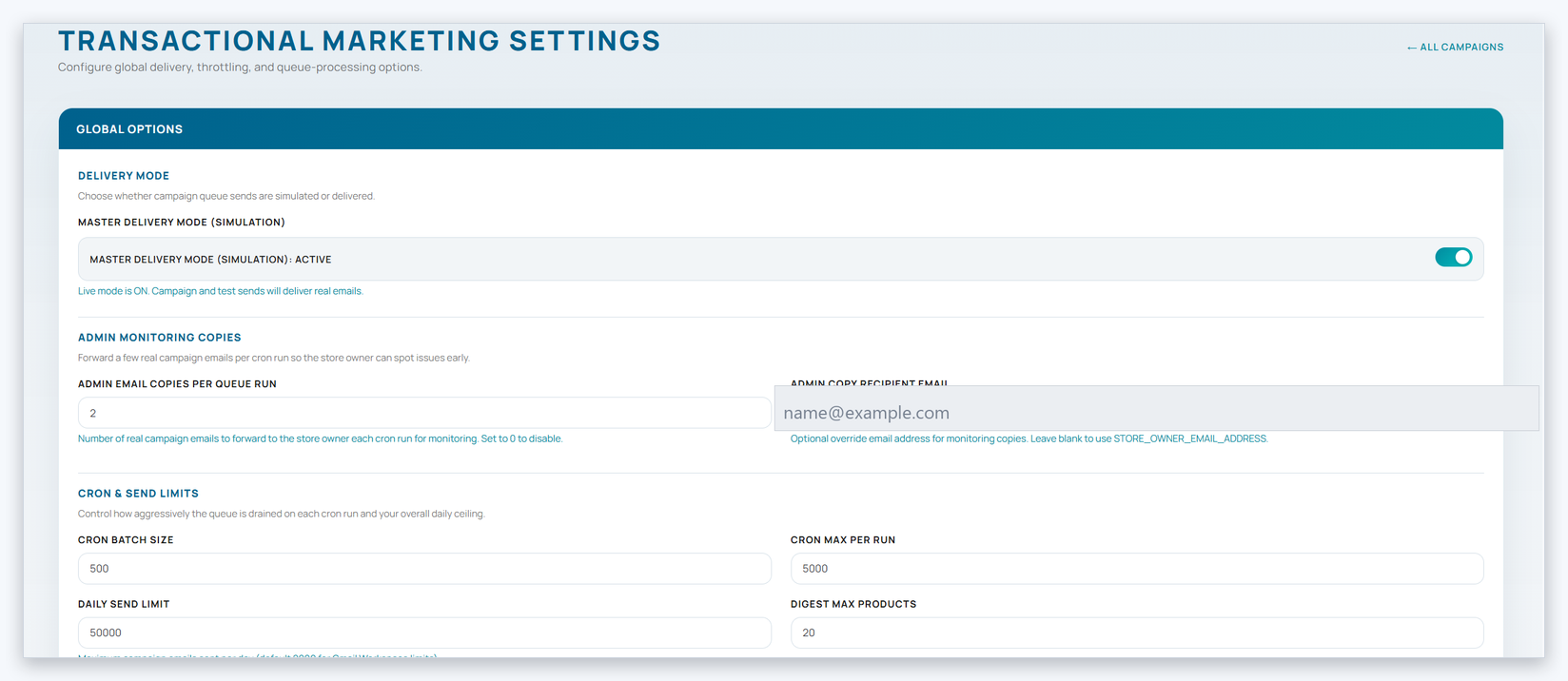
4. Global settings
One page covers throttle limits (the v1.2.0 SendGrid-friendly defaults: 600 emails / minute, 50,000 / day, 270 s runtime cap), admin monitoring copies, the cron batch / max-per-run controls, and the new Ecommerce Attribution section. Two new settings (attribution_enabled, attribution_cookie_lifetime_days) let you turn revenue tracking on or off and tune the attribution window.

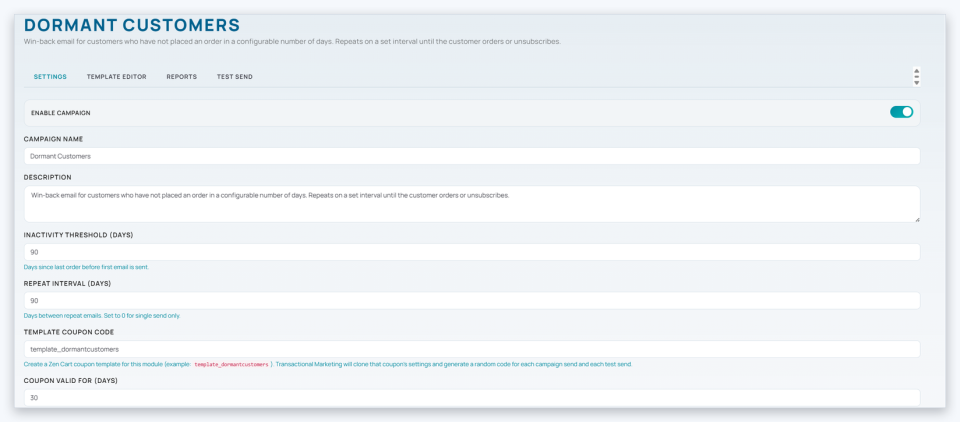
5. Per-campaign configuration
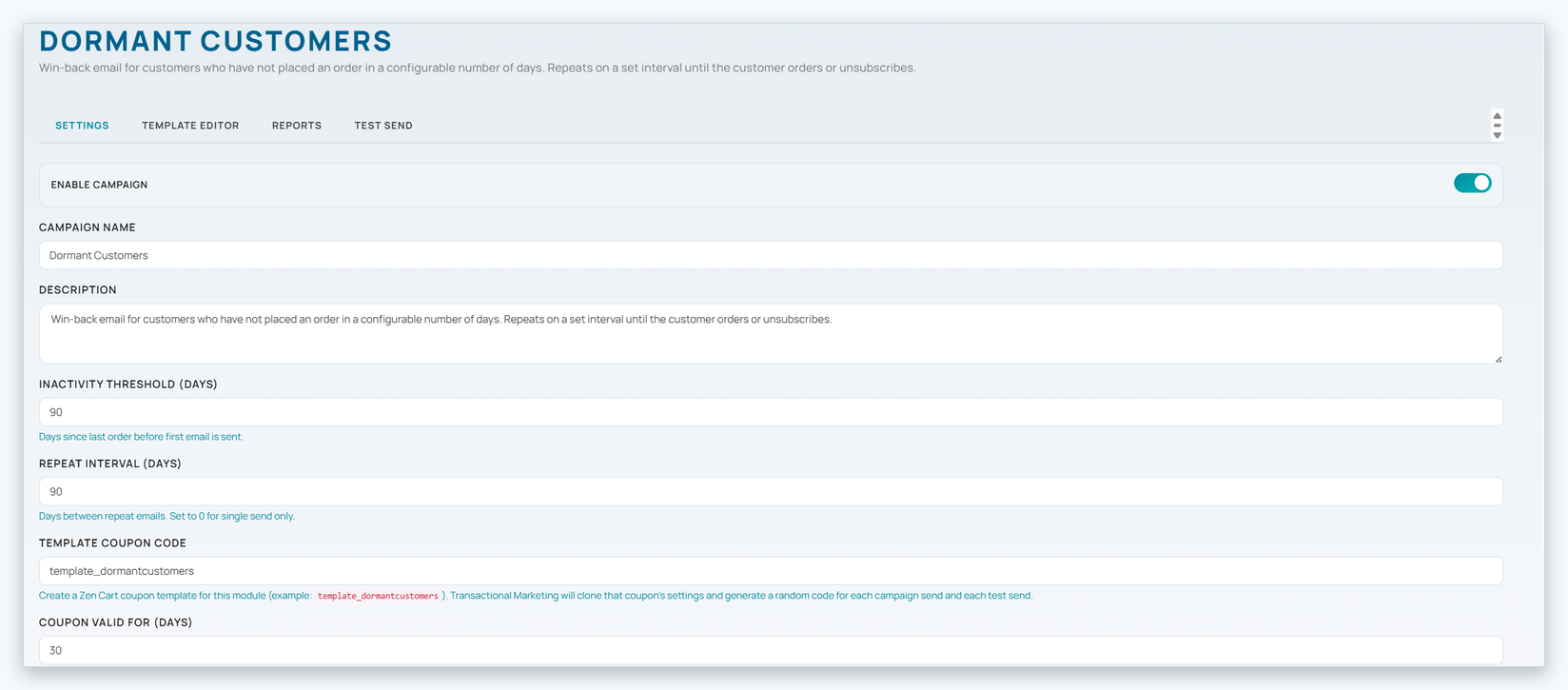
Every campaign module ships with a pre-built responsive HTML template, sensible default settings, and a published status so you can switch it on and start sending. Each one has its own configuration form (inactivity threshold, repeat interval, template coupon, copy windows), inline preview / "Send a test" tools, and a fully populated Reports tab from the very first cron run.

Current version: v1.2.0 (released 2026-06-02). See the Version History tab below for the full changelog.
Ask & Answer
Have a question about this product? Ask below and we’ll get back to you shortly.
Features
- 5 ready-made transactional email campaign modules.
- Drag-and-drop GrapesJS email builder with image, button, columns, and product blocks.
- Per-campaign analytics: opens, clicks, total sent.
- Throttling, daily limits, retries, and circuit breaker for safe high-volume sending.
- HMAC-signed unsubscribe and tracking tokens.
- Single-use coupon template service.
- Encapsulated Zen Cart 2.x plugin with scripted migrations.
- Compatible with Zen Cart 2.0.1+ and PHP 7.4+.
Requirements
Platform
- Zen Cart
Version
- 2.0.0
- 2.0.1
- 2.1.0
Version History
| 1.8.14 | Oct 9, 2026 | View change log 1.8.14 Change logVersion notes
Added
|
| 1.8.13 | Sep 8, 2026 | View change log 1.8.13 Change logVersion notes
Added
|
| 1.8.12 | Aug 15, 2026 | View change log 1.8.12 Change logVersion notes
Added
|
| 1.8.11 | Aug 15, 2026 | View change log 1.8.11 Change logVersion notes
Added
|
Five Built-In Campaign Modules
Every module ships ready to use with a pre-built responsive template, an admin dashboard, and a send-once safety net. Toggle them on individually as you need them.
Abandoned Cart
Recover sales from carts abandoned for a configurable window. Minimum cart value, max resends, optional coupon incentives, and a start-date cutover so legacy carts are never re-mailed.
Dormant Customers
Win back customers who haven't ordered for X days. Configurable repeat intervals, optional coupon + product picks, and per-customer send-once guarantees.
Review Reminders
Post-purchase review request sent N days after an order reaches a target status. Once per order. Include / exclude lists by product, category, or product type for surgical control.
New Product Notifications
One-per-product or digest mode for newsletter subscribers when products are added. Configurable description length, image width, and a start-date cutover so an existing catalog never broadcasts on the first cron run.
Welcome Email
One-time welcome message for new newsletter-subscribed accounts after a configurable delay, with optional coupon incentive and a cutover start_date so old accounts are not back-mailed.
Ecommerce Attribution NEW in v1.2.0
Every send is revenue-aware. A signed cookie ties each click to the email that drove it, so the conversion appears on per-campaign reports as Orders, Revenue, Conversion Rate, and AOV — alongside the existing Opens and Clicks.
NEW in v1.2.0
Know Which Emails Drive Revenue
Every campaign send is now revenue-aware. Stop guessing whether your win-back email actually paid for itself — see it in dollars, per send.
- Per-send Orders & Revenue The send-log table and CSV export show which individual recipients converted and how much they spent.
- Four new KPI tiles Orders, Revenue, Conversion Rate, and Average Order Value join the existing Opens / Clicks tiles on every campaign Reports tab.
- Revenue on the time-series chart Daily Orders bar and a Revenue line on a secondary axis, charted alongside Sends, Opens, and Clicks.
- First-party, privacy-respecting An HMAC-signed cookie tied to the recipient's
log_id. No third-party scripts, no external analytics. All stored in your own Zen Cart database. - Idempotent & tamper-rejecting A
UNIQUE(orders_id)constraint means refreshes never double-count, and a tampered cookie is rejected at the door.

How to Install
Encapsulated Zen Cart 2.x plugin — drop in the folder, click Install in the Plugin Manager, schedule one cron job. No core files are touched.
1
Upload & install
Drop zc_plugins/TransactionalMarketing/ into your store and click Install on the Zen Cart Plugin Manager. The installer runs every migration automatically (CREATE TABLE IF NOT EXISTS / INSERT IGNORE — safe on existing installs).
2
Enter your license
The plugin performs an authenticated remote license check against direct.numinix.com on every admin page load and cron run. Paste your domain-bound licence in Configuration → Transactional Marketing and click Re-check now.
3
Schedule one cron
Point a single cron job at zc_plugins/TransactionalMarketing/v1.0.0/cron/run.php on a 5-minute interval. File locking, batch processing, and the 270 s runtime cap make it safe to run as often as you like. That's it — the dashboard takes over from here.
1000+
Websites Built

250+
Plugins Developed

$20M
in Monthly Client Revenue

No reviews yet. Be first to write a review.
Reviews
Recommended Products
Recommended Products
- Hourly Programming/Design For Zen Cart $130.00 USD


Service Policy
Our stated prices for all modules we install are based on installation into the default platform configuration. We always ensure your logo and basic color palette are in place when we install a plugin. However, any additional "custom" styling, design work, or derivitive tasks generated due to a site's non-default configuration could require additional prepaid programming hours.
This plugin is open source and requires ionCube Loader v4.4 or later to be compiled with PHP in order to install and upgrade the plugin. All orders are automatically subscribed to the billing frequency selected at the time of purchase. Recurring billing can be cancelled at any time. Once your license has expired, a new license will be required in order to continue using the plugin.
